> ## Documentation Index
> Fetch the complete documentation index at: https://docs-dev-feat-anonymous-sessions.mintlify.site/llms.txt
> Use this file to discover all available pages before exploring further.

> Configure an update policy form using Forms for Actions

# Use Cases: Configure an update policy form using Forms

<Card title="Before you start">
  1. Create a [Machine-to-Machine Application](/docs/get-started/auth0-overview/create-applications/machine-to-machine-apps) with the following scopes enabled:

  * `read:users`
  * `update:users`
  * `create:users`
  * `read:users_app_metadata`
  * `update:users_app_metadata`
  * `create:users_app_metadata`

  2. Add a [Vault connection](/docs/customize/forms/vault) using the M2M application credentials.
</Card>

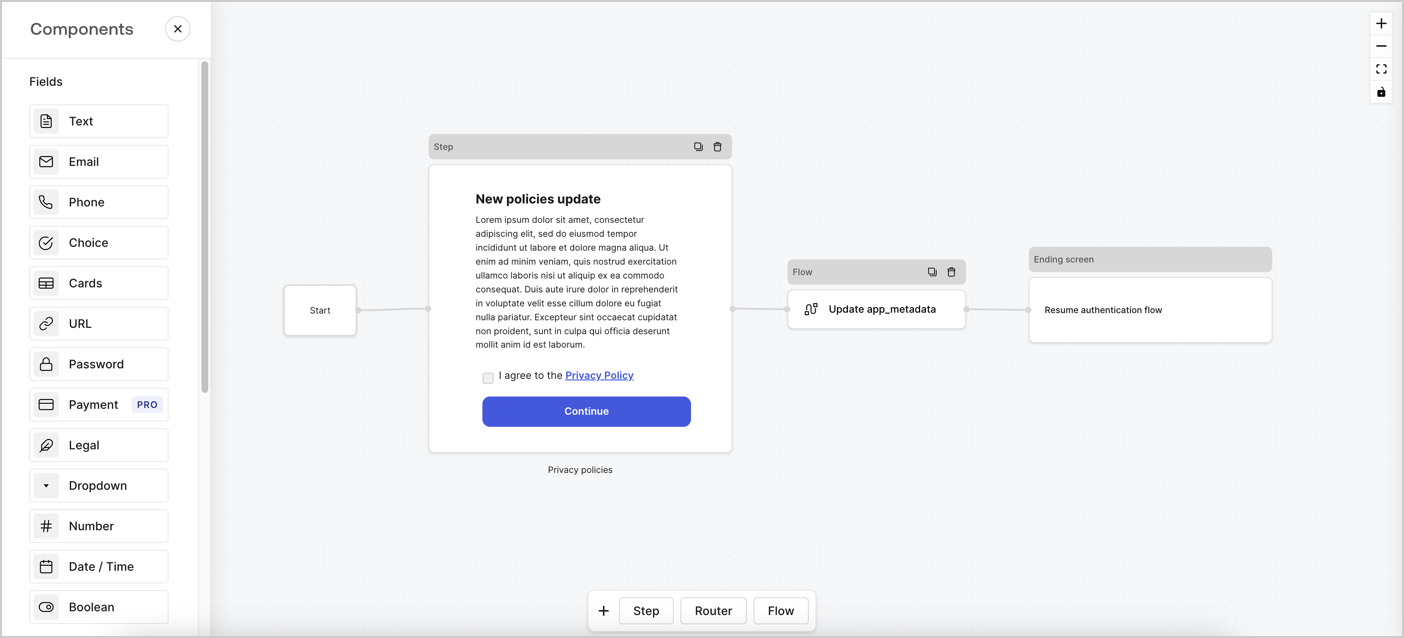
Forms for Actions allows you to create custom privacy policies flows and store the consent under the `app_metadata` object.
<Frame>
  <img src="https://mintcdn.com/docs-dev-feat-anonymous-sessions/E6BD1J6eEuZHPgAT/docs/images/cdy7uua7fh8z/6i68dMvHDTijfRmSgN1x8Q/ad900e7d4c0fb34645921435472b8684/privavy-policy-form.png?fit=max&auto=format&n=E6BD1J6eEuZHPgAT&q=85&s=646f82b653697ca83febc0aef6514c8e" alt="Dashboard > Actions > Forms > Privacy policy use case" data-og-width="1404" width="1404" data-og-height="638" height="638" data-path="docs/images/cdy7uua7fh8z/6i68dMvHDTijfRmSgN1x8Q/ad900e7d4c0fb34645921435472b8684/privavy-policy-form.png" data-optimize="true" data-opv="3" srcset="https://mintcdn.com/docs-dev-feat-anonymous-sessions/E6BD1J6eEuZHPgAT/docs/images/cdy7uua7fh8z/6i68dMvHDTijfRmSgN1x8Q/ad900e7d4c0fb34645921435472b8684/privavy-policy-form.png?w=280&fit=max&auto=format&n=E6BD1J6eEuZHPgAT&q=85&s=451fde40bd09ef4f4b3d68fd8c9eeb77 280w, https://mintcdn.com/docs-dev-feat-anonymous-sessions/E6BD1J6eEuZHPgAT/docs/images/cdy7uua7fh8z/6i68dMvHDTijfRmSgN1x8Q/ad900e7d4c0fb34645921435472b8684/privavy-policy-form.png?w=560&fit=max&auto=format&n=E6BD1J6eEuZHPgAT&q=85&s=f354ed9fb5c9a9b3c1aa0d847ba66786 560w, https://mintcdn.com/docs-dev-feat-anonymous-sessions/E6BD1J6eEuZHPgAT/docs/images/cdy7uua7fh8z/6i68dMvHDTijfRmSgN1x8Q/ad900e7d4c0fb34645921435472b8684/privavy-policy-form.png?w=840&fit=max&auto=format&n=E6BD1J6eEuZHPgAT&q=85&s=6068996cba4379e126d033842f959cec 840w, https://mintcdn.com/docs-dev-feat-anonymous-sessions/E6BD1J6eEuZHPgAT/docs/images/cdy7uua7fh8z/6i68dMvHDTijfRmSgN1x8Q/ad900e7d4c0fb34645921435472b8684/privavy-policy-form.png?w=1100&fit=max&auto=format&n=E6BD1J6eEuZHPgAT&q=85&s=db8b49940575e29af840aacd4e115b7e 1100w, https://mintcdn.com/docs-dev-feat-anonymous-sessions/E6BD1J6eEuZHPgAT/docs/images/cdy7uua7fh8z/6i68dMvHDTijfRmSgN1x8Q/ad900e7d4c0fb34645921435472b8684/privavy-policy-form.png?w=1650&fit=max&auto=format&n=E6BD1J6eEuZHPgAT&q=85&s=377a98f549764e35b671b618a7d07e70 1650w, https://mintcdn.com/docs-dev-feat-anonymous-sessions/E6BD1J6eEuZHPgAT/docs/images/cdy7uua7fh8z/6i68dMvHDTijfRmSgN1x8Q/ad900e7d4c0fb34645921435472b8684/privavy-policy-form.png?w=2500&fit=max&auto=format&n=E6BD1J6eEuZHPgAT&q=85&s=99931362a18882c497fc5ccbb962f6c5 2500w" />
</Frame>

The sections below outline how you can create an Update Policy form using nodes and flows, along with steps for adding your form to a [Post Login](/docs/customize/actions/explore-triggers/signup-and-login-triggers/login-trigger) Action.

## Create a form from scratch

Follow these steps to create a form to gather information:

1. Open the Form editor by selecting **Auth0 Dashboard > Actions > Forms.**
2. Select **Create Form** > **Start from scratch**.

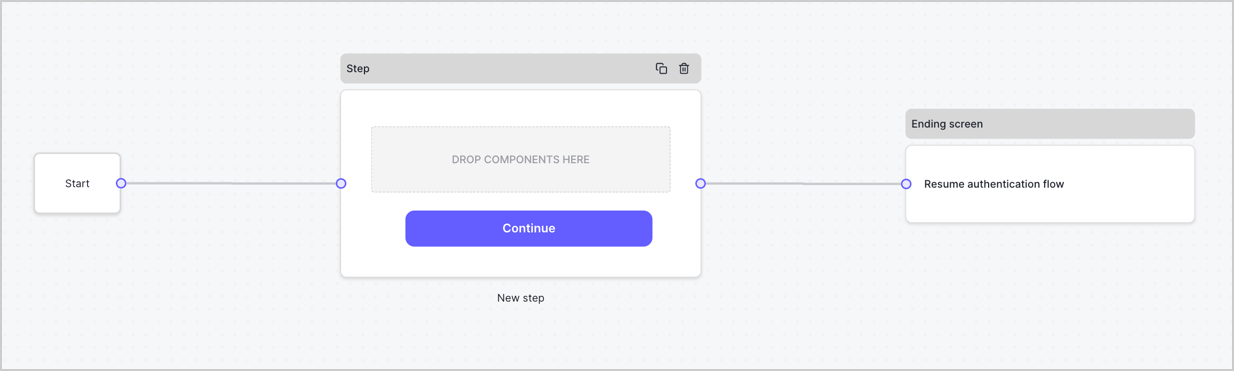
By default, a new form contains a Start node, a Step node, and an Ending screen node.
<Frame>
  <img src="https://mintcdn.com/docs-dev-feat-anonymous-sessions/LcjdfJa2VGQ8OAzg/docs/images/cdy7uua7fh8z/2TZ9jSjgEcARFpULI6hz4R/a4319a1bd482f2ee5cc23100fdb2f42c/New-form-Forms-for-action-use-case.png?fit=max&auto=format&n=LcjdfJa2VGQ8OAzg&q=85&s=9f1fd33e0f9ef4b2a541ffdbb99e5fe7" alt="Dashboard > Forms > Use Cases > Form" data-og-width="1234" width="1234" data-og-height="371" height="371" data-path="docs/images/cdy7uua7fh8z/2TZ9jSjgEcARFpULI6hz4R/a4319a1bd482f2ee5cc23100fdb2f42c/New-form-Forms-for-action-use-case.png" data-optimize="true" data-opv="3" srcset="https://mintcdn.com/docs-dev-feat-anonymous-sessions/LcjdfJa2VGQ8OAzg/docs/images/cdy7uua7fh8z/2TZ9jSjgEcARFpULI6hz4R/a4319a1bd482f2ee5cc23100fdb2f42c/New-form-Forms-for-action-use-case.png?w=280&fit=max&auto=format&n=LcjdfJa2VGQ8OAzg&q=85&s=e07d58d8afc437a5d94f25ec44f27db7 280w, https://mintcdn.com/docs-dev-feat-anonymous-sessions/LcjdfJa2VGQ8OAzg/docs/images/cdy7uua7fh8z/2TZ9jSjgEcARFpULI6hz4R/a4319a1bd482f2ee5cc23100fdb2f42c/New-form-Forms-for-action-use-case.png?w=560&fit=max&auto=format&n=LcjdfJa2VGQ8OAzg&q=85&s=4e88de89ca77ae5ac3ffed0f70dc6fa1 560w, https://mintcdn.com/docs-dev-feat-anonymous-sessions/LcjdfJa2VGQ8OAzg/docs/images/cdy7uua7fh8z/2TZ9jSjgEcARFpULI6hz4R/a4319a1bd482f2ee5cc23100fdb2f42c/New-form-Forms-for-action-use-case.png?w=840&fit=max&auto=format&n=LcjdfJa2VGQ8OAzg&q=85&s=fff842f0b4d677e4d80a2da0a24c879e 840w, https://mintcdn.com/docs-dev-feat-anonymous-sessions/LcjdfJa2VGQ8OAzg/docs/images/cdy7uua7fh8z/2TZ9jSjgEcARFpULI6hz4R/a4319a1bd482f2ee5cc23100fdb2f42c/New-form-Forms-for-action-use-case.png?w=1100&fit=max&auto=format&n=LcjdfJa2VGQ8OAzg&q=85&s=799dbb1ceb9e277b4031d6d43f3fea06 1100w, https://mintcdn.com/docs-dev-feat-anonymous-sessions/LcjdfJa2VGQ8OAzg/docs/images/cdy7uua7fh8z/2TZ9jSjgEcARFpULI6hz4R/a4319a1bd482f2ee5cc23100fdb2f42c/New-form-Forms-for-action-use-case.png?w=1650&fit=max&auto=format&n=LcjdfJa2VGQ8OAzg&q=85&s=36189dfe382aa2bc9b8e13376bae263d 1650w, https://mintcdn.com/docs-dev-feat-anonymous-sessions/LcjdfJa2VGQ8OAzg/docs/images/cdy7uua7fh8z/2TZ9jSjgEcARFpULI6hz4R/a4319a1bd482f2ee5cc23100fdb2f42c/New-form-Forms-for-action-use-case.png?w=2500&fit=max&auto=format&n=LcjdfJa2VGQ8OAzg&q=85&s=562cd9a8a567fbc27be1249e81bfdfac 2500w" />
</Frame>

### Configure the Step node

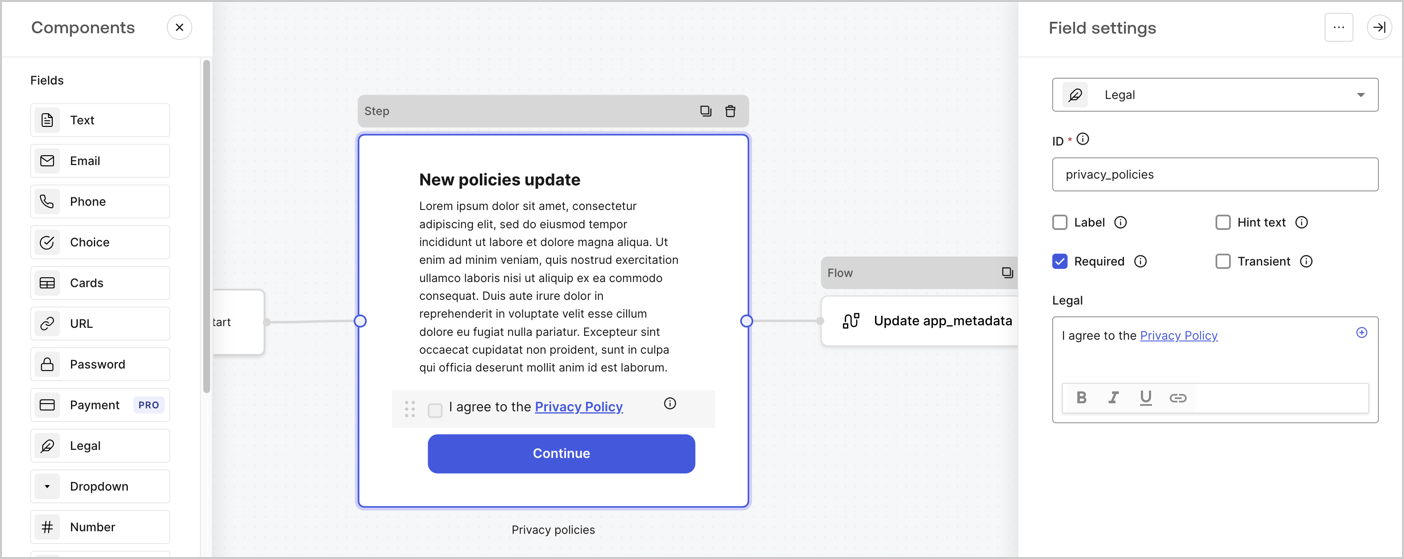
The Step node is the graphical interface visible to users. Add [Fields](/docs/customize/forms/nodes-and-components) to the Step node to collect the new agreement acceptance value by following these steps:

1. Drag a **Rich text** field from the **Components menu** into the **Step** node.

   * **Rich text**: Enter a description of your privacy policies updates.
   * Select **Save**.
2. Drag a **Legal** field into the **Step** node.

   * **ID**: Enter `privacy_policies`.
   * **Required**: Enable the checkbox.
   * **Legal**: Enter `I agree to the Privacy Policy`.
   * Select **Save**.
3. Select **Publish** to save.
<Frame>
  <img src="https://mintcdn.com/docs-dev-feat-anonymous-sessions/qQBBV0zMSd4y9DpJ/docs/images/cdy7uua7fh8z/59zFFjQjAnjogkc2QGIqqJ/0ad66b1b636544122aa4e65968b76c2c/privacy-policy-step-node.png?fit=max&auto=format&n=qQBBV0zMSd4y9DpJ&q=85&s=c47de3f9956877d929fb7b248b852982" alt="Dashboard > Actions > Forms > Use case privacy policy step node" data-og-width="1404" width="1404" data-og-height="559" height="559" data-path="docs/images/cdy7uua7fh8z/59zFFjQjAnjogkc2QGIqqJ/0ad66b1b636544122aa4e65968b76c2c/privacy-policy-step-node.png" data-optimize="true" data-opv="3" srcset="https://mintcdn.com/docs-dev-feat-anonymous-sessions/qQBBV0zMSd4y9DpJ/docs/images/cdy7uua7fh8z/59zFFjQjAnjogkc2QGIqqJ/0ad66b1b636544122aa4e65968b76c2c/privacy-policy-step-node.png?w=280&fit=max&auto=format&n=qQBBV0zMSd4y9DpJ&q=85&s=6e96f38e6c66421d7d28b8daec9b3069 280w, https://mintcdn.com/docs-dev-feat-anonymous-sessions/qQBBV0zMSd4y9DpJ/docs/images/cdy7uua7fh8z/59zFFjQjAnjogkc2QGIqqJ/0ad66b1b636544122aa4e65968b76c2c/privacy-policy-step-node.png?w=560&fit=max&auto=format&n=qQBBV0zMSd4y9DpJ&q=85&s=476d3ac86dffefc6e4e8318314d6a531 560w, https://mintcdn.com/docs-dev-feat-anonymous-sessions/qQBBV0zMSd4y9DpJ/docs/images/cdy7uua7fh8z/59zFFjQjAnjogkc2QGIqqJ/0ad66b1b636544122aa4e65968b76c2c/privacy-policy-step-node.png?w=840&fit=max&auto=format&n=qQBBV0zMSd4y9DpJ&q=85&s=6db465f426e8a3763b3c926b6095e265 840w, https://mintcdn.com/docs-dev-feat-anonymous-sessions/qQBBV0zMSd4y9DpJ/docs/images/cdy7uua7fh8z/59zFFjQjAnjogkc2QGIqqJ/0ad66b1b636544122aa4e65968b76c2c/privacy-policy-step-node.png?w=1100&fit=max&auto=format&n=qQBBV0zMSd4y9DpJ&q=85&s=1c5cf41010ffb6f25f28ea1ff6d824e1 1100w, https://mintcdn.com/docs-dev-feat-anonymous-sessions/qQBBV0zMSd4y9DpJ/docs/images/cdy7uua7fh8z/59zFFjQjAnjogkc2QGIqqJ/0ad66b1b636544122aa4e65968b76c2c/privacy-policy-step-node.png?w=1650&fit=max&auto=format&n=qQBBV0zMSd4y9DpJ&q=85&s=df79d8b40b8e35dd7d20e9046ea56b38 1650w, https://mintcdn.com/docs-dev-feat-anonymous-sessions/qQBBV0zMSd4y9DpJ/docs/images/cdy7uua7fh8z/59zFFjQjAnjogkc2QGIqqJ/0ad66b1b636544122aa4e65968b76c2c/privacy-policy-step-node.png?w=2500&fit=max&auto=format&n=qQBBV0zMSd4y9DpJ&q=85&s=445bb6496b75ac3f46c3cbd2ede7b807 2500w" />
</Frame>

### Configure the Flow node

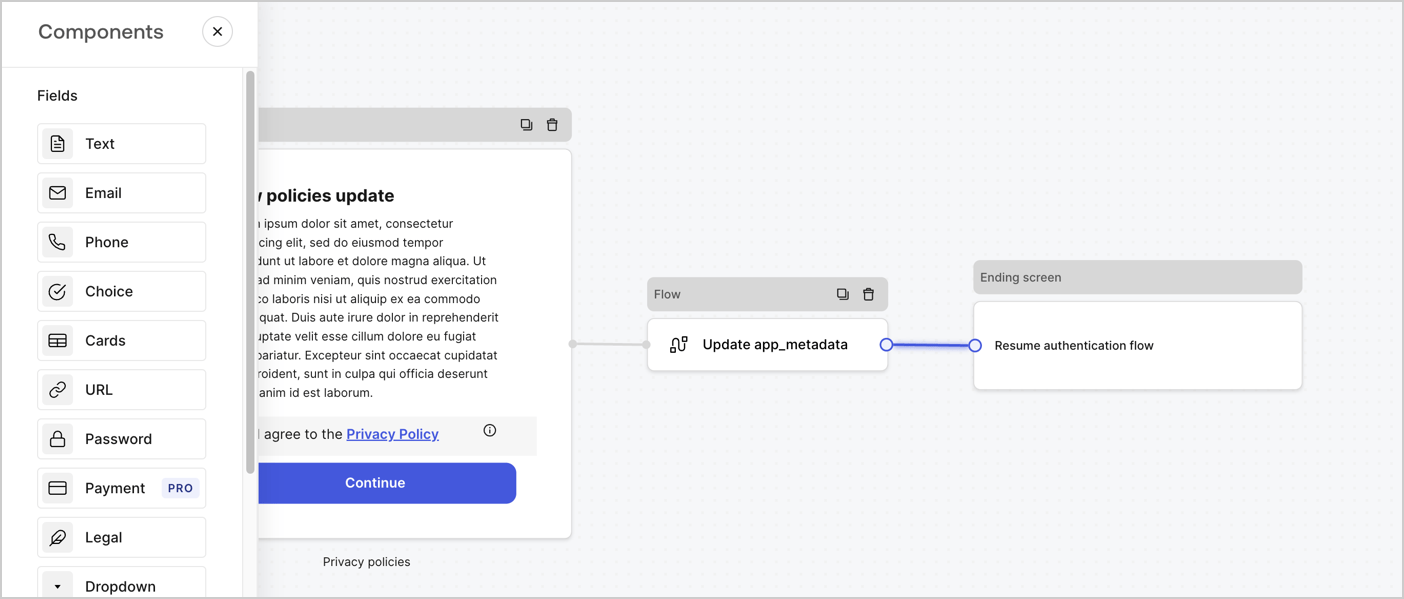
Add a **Flow** node after the **Step** node to update the `app_metadata` and resume the authentication flow by following these steps:

1. Select **Flow** from the bottom of the Form editor.
2. Remove the existing link between the **Step** and **Ending Screen** nodes.
3. Select the new **Flow** > **Click to add a flow** > **Create a new flow.**

   * Enter `Update app_metadata` in the **Name** field.
   * Select **Create**.
   * Select **Save**.
4. Link the **Flow** node to the **Step** and **Ending Screen** nodes as pictured below.
5. Select **Publish** to save.
<Frame>
  <img src="https://mintcdn.com/docs-dev-feat-anonymous-sessions/E6BD1J6eEuZHPgAT/docs/images/cdy7uua7fh8z/6YIkzm7SrpM9LW76AXuRzh/353c518fe82bbaa440836da1d83596d6/link-policies.png?fit=max&auto=format&n=E6BD1J6eEuZHPgAT&q=85&s=ac459f37e3265edb60e28e73b39f173a" alt="Dashboard > Actions > Forms > Form" data-og-width="1404" width="1404" data-og-height="599" height="599" data-path="docs/images/cdy7uua7fh8z/6YIkzm7SrpM9LW76AXuRzh/353c518fe82bbaa440836da1d83596d6/link-policies.png" data-optimize="true" data-opv="3" srcset="https://mintcdn.com/docs-dev-feat-anonymous-sessions/E6BD1J6eEuZHPgAT/docs/images/cdy7uua7fh8z/6YIkzm7SrpM9LW76AXuRzh/353c518fe82bbaa440836da1d83596d6/link-policies.png?w=280&fit=max&auto=format&n=E6BD1J6eEuZHPgAT&q=85&s=ca306e922d92b0fe913c7bd8dfefb5a6 280w, https://mintcdn.com/docs-dev-feat-anonymous-sessions/E6BD1J6eEuZHPgAT/docs/images/cdy7uua7fh8z/6YIkzm7SrpM9LW76AXuRzh/353c518fe82bbaa440836da1d83596d6/link-policies.png?w=560&fit=max&auto=format&n=E6BD1J6eEuZHPgAT&q=85&s=0e240b13d3234158e2645215c3b5c8f5 560w, https://mintcdn.com/docs-dev-feat-anonymous-sessions/E6BD1J6eEuZHPgAT/docs/images/cdy7uua7fh8z/6YIkzm7SrpM9LW76AXuRzh/353c518fe82bbaa440836da1d83596d6/link-policies.png?w=840&fit=max&auto=format&n=E6BD1J6eEuZHPgAT&q=85&s=a97bfe88da7f57c2de65de672d135baf 840w, https://mintcdn.com/docs-dev-feat-anonymous-sessions/E6BD1J6eEuZHPgAT/docs/images/cdy7uua7fh8z/6YIkzm7SrpM9LW76AXuRzh/353c518fe82bbaa440836da1d83596d6/link-policies.png?w=1100&fit=max&auto=format&n=E6BD1J6eEuZHPgAT&q=85&s=94cbc3e6f2f89f7e30e78cc7454e7ece 1100w, https://mintcdn.com/docs-dev-feat-anonymous-sessions/E6BD1J6eEuZHPgAT/docs/images/cdy7uua7fh8z/6YIkzm7SrpM9LW76AXuRzh/353c518fe82bbaa440836da1d83596d6/link-policies.png?w=1650&fit=max&auto=format&n=E6BD1J6eEuZHPgAT&q=85&s=e8e6b642c2795741c7d769721810928c 1650w, https://mintcdn.com/docs-dev-feat-anonymous-sessions/E6BD1J6eEuZHPgAT/docs/images/cdy7uua7fh8z/6YIkzm7SrpM9LW76AXuRzh/353c518fe82bbaa440836da1d83596d6/link-policies.png?w=2500&fit=max&auto=format&n=E6BD1J6eEuZHPgAT&q=85&s=2b0136b8701be920232b0f5c83fe5170 2500w" />
</Frame>

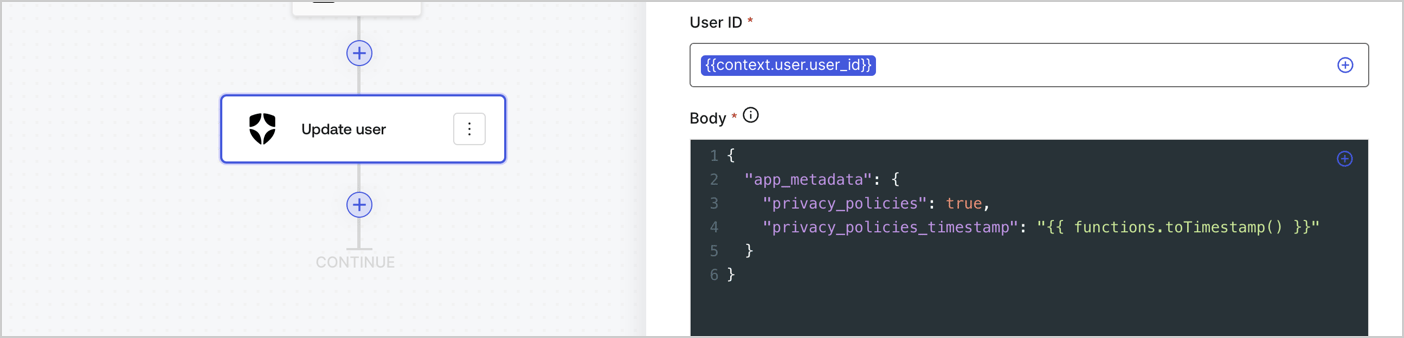
Add an Auth0 Update user action to the flow by following these steps:

1. Select the **Flow** **Update app\_metadata** > **Edit flow** to open the Flow editor in a new tab.
2. Below the StartAction, select the **+** icon to add an **Update user** action. Complete the fields below, then select **Save** to continue.

   * **Connection**: Select from the dropdown the Vault connection to your M2M application.

   * **User ID**: Enter `{{context.user.user_id}}`.

   * **Body**: Copy and paste the following code to update the app\_metadata with the privacy\_policies and privacy\_policies\_timestamp properties.

     ```text lines theme={null}
     {
       "app_metadata": {
         "privacy_policies": true,
         "privacy_policies_timestamp": "{{ functions.toTimestamp() }}"
       }
     }
     ```

   * Select **Save**.
3. Select **Publish** to save.
<Frame>
  <img src="https://mintcdn.com/docs-dev-feat-anonymous-sessions/IrFel2-Cpvi-5RPD/docs/images/cdy7uua7fh8z/CvMNIwWrOUwaFW4X3G28p/1fb70ae57a20749d9ffaaba8dc0b7e26/update-user-privacy.png?fit=max&auto=format&n=IrFel2-Cpvi-5RPD&q=85&s=0445b074ba69a08fab65a18a71d1412e" alt="Dashboard > Actions > Forms > User case privacy policy code" data-og-width="1404" width="1404" data-og-height="338" height="338" data-path="docs/images/cdy7uua7fh8z/CvMNIwWrOUwaFW4X3G28p/1fb70ae57a20749d9ffaaba8dc0b7e26/update-user-privacy.png" data-optimize="true" data-opv="3" srcset="https://mintcdn.com/docs-dev-feat-anonymous-sessions/IrFel2-Cpvi-5RPD/docs/images/cdy7uua7fh8z/CvMNIwWrOUwaFW4X3G28p/1fb70ae57a20749d9ffaaba8dc0b7e26/update-user-privacy.png?w=280&fit=max&auto=format&n=IrFel2-Cpvi-5RPD&q=85&s=09f7633ed79460424085bc3b03a9ac52 280w, https://mintcdn.com/docs-dev-feat-anonymous-sessions/IrFel2-Cpvi-5RPD/docs/images/cdy7uua7fh8z/CvMNIwWrOUwaFW4X3G28p/1fb70ae57a20749d9ffaaba8dc0b7e26/update-user-privacy.png?w=560&fit=max&auto=format&n=IrFel2-Cpvi-5RPD&q=85&s=a489bddb5c84ccc4c1cde084ec08c7bc 560w, https://mintcdn.com/docs-dev-feat-anonymous-sessions/IrFel2-Cpvi-5RPD/docs/images/cdy7uua7fh8z/CvMNIwWrOUwaFW4X3G28p/1fb70ae57a20749d9ffaaba8dc0b7e26/update-user-privacy.png?w=840&fit=max&auto=format&n=IrFel2-Cpvi-5RPD&q=85&s=0dd335f62108def8f92c828f0a204d77 840w, https://mintcdn.com/docs-dev-feat-anonymous-sessions/IrFel2-Cpvi-5RPD/docs/images/cdy7uua7fh8z/CvMNIwWrOUwaFW4X3G28p/1fb70ae57a20749d9ffaaba8dc0b7e26/update-user-privacy.png?w=1100&fit=max&auto=format&n=IrFel2-Cpvi-5RPD&q=85&s=dc780138bf640ec4a512d7bc5f94b009 1100w, https://mintcdn.com/docs-dev-feat-anonymous-sessions/IrFel2-Cpvi-5RPD/docs/images/cdy7uua7fh8z/CvMNIwWrOUwaFW4X3G28p/1fb70ae57a20749d9ffaaba8dc0b7e26/update-user-privacy.png?w=1650&fit=max&auto=format&n=IrFel2-Cpvi-5RPD&q=85&s=501531442011c353aa5e3382a77e5247 1650w, https://mintcdn.com/docs-dev-feat-anonymous-sessions/IrFel2-Cpvi-5RPD/docs/images/cdy7uua7fh8z/CvMNIwWrOUwaFW4X3G28p/1fb70ae57a20749d9ffaaba8dc0b7e26/update-user-privacy.png?w=2500&fit=max&auto=format&n=IrFel2-Cpvi-5RPD&q=85&s=7766feacd1c4b6928992e40c4feda249 2500w" />
</Frame>

<Callout icon="file-lines" color="#0EA5E9" iconType="regular">
  The flow **Update app\_metadata** adds a `privacy_policies true` value to the app`_metadata` object and also generates a timestamp with a [helper function.](/docs/customize/forms/variables)
</Callout>

## Retrieve the form render code

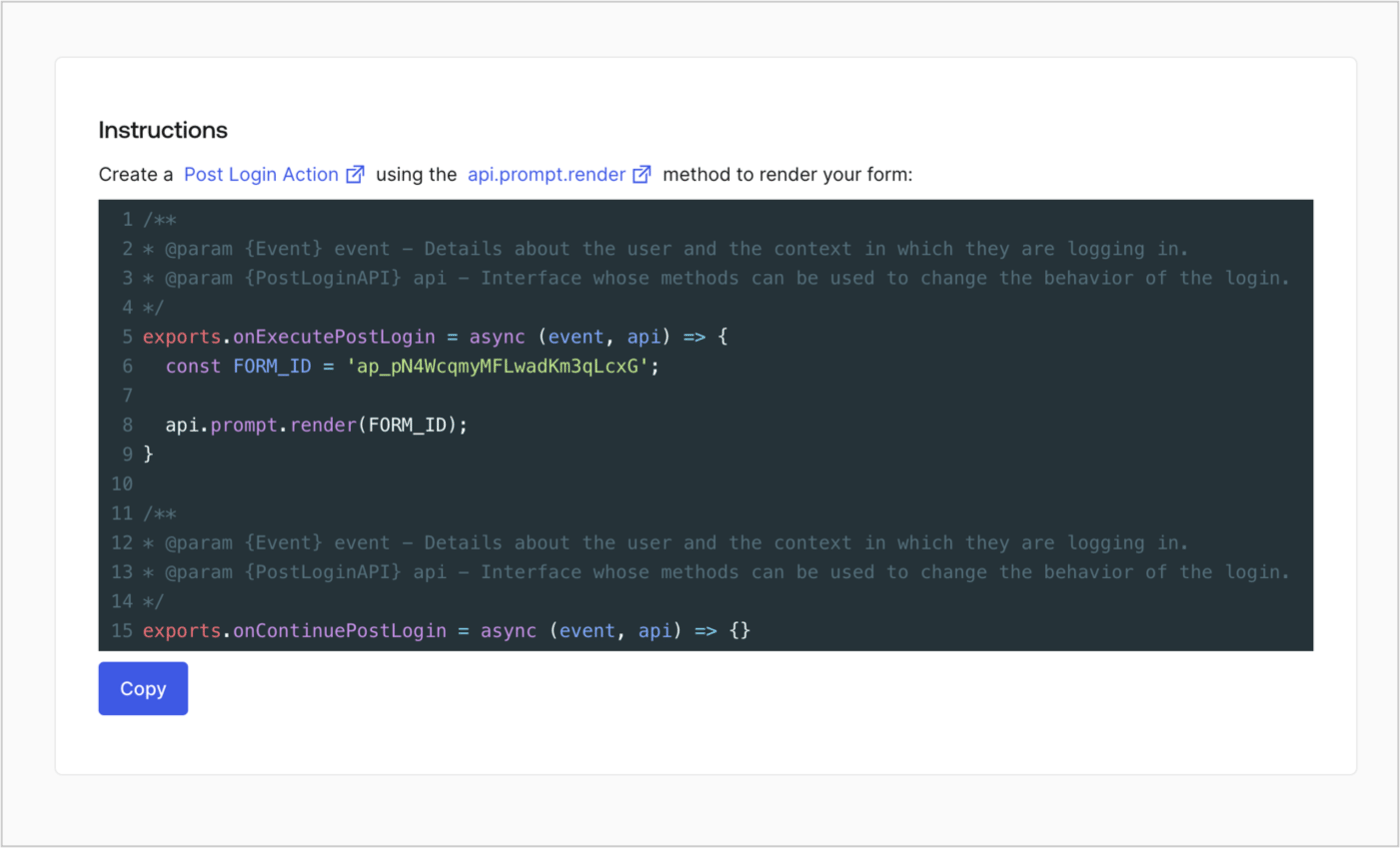
Retrieve your form render code to visually render the form with a custom Post Login Action by following these steps:

* From the Form editor, select **`<> Render`**.
* Select **Copy**.
<Frame>
  <img src="https://mintcdn.com/docs-dev-feat-anonymous-sessions/SOqqdJKY013uSscj/docs/images/cdy7uua7fh8z/2EIUzc539sq9lwoTKbjoJv/496a864c0fc44a782c9cadca119dbfb0/embed.png?fit=max&auto=format&n=SOqqdJKY013uSscj&q=85&s=a218d4974a76b5edb00ee0ff81930461" alt="Dashboard > Actions > Forms > Form > Embed" data-og-width="1400" width="1400" data-og-height="848" height="848" data-path="docs/images/cdy7uua7fh8z/2EIUzc539sq9lwoTKbjoJv/496a864c0fc44a782c9cadca119dbfb0/embed.png" data-optimize="true" data-opv="3" srcset="https://mintcdn.com/docs-dev-feat-anonymous-sessions/SOqqdJKY013uSscj/docs/images/cdy7uua7fh8z/2EIUzc539sq9lwoTKbjoJv/496a864c0fc44a782c9cadca119dbfb0/embed.png?w=280&fit=max&auto=format&n=SOqqdJKY013uSscj&q=85&s=788b22f8a9fdfa6aaeef763c58e3ed69 280w, https://mintcdn.com/docs-dev-feat-anonymous-sessions/SOqqdJKY013uSscj/docs/images/cdy7uua7fh8z/2EIUzc539sq9lwoTKbjoJv/496a864c0fc44a782c9cadca119dbfb0/embed.png?w=560&fit=max&auto=format&n=SOqqdJKY013uSscj&q=85&s=1daf4ba9addf169a2d241c8fc0c733b8 560w, https://mintcdn.com/docs-dev-feat-anonymous-sessions/SOqqdJKY013uSscj/docs/images/cdy7uua7fh8z/2EIUzc539sq9lwoTKbjoJv/496a864c0fc44a782c9cadca119dbfb0/embed.png?w=840&fit=max&auto=format&n=SOqqdJKY013uSscj&q=85&s=30f458feeafd85d7dc6da901a42fac5f 840w, https://mintcdn.com/docs-dev-feat-anonymous-sessions/SOqqdJKY013uSscj/docs/images/cdy7uua7fh8z/2EIUzc539sq9lwoTKbjoJv/496a864c0fc44a782c9cadca119dbfb0/embed.png?w=1100&fit=max&auto=format&n=SOqqdJKY013uSscj&q=85&s=2701d348f20d47dff4bfbe56f6731011 1100w, https://mintcdn.com/docs-dev-feat-anonymous-sessions/SOqqdJKY013uSscj/docs/images/cdy7uua7fh8z/2EIUzc539sq9lwoTKbjoJv/496a864c0fc44a782c9cadca119dbfb0/embed.png?w=1650&fit=max&auto=format&n=SOqqdJKY013uSscj&q=85&s=8a7dd434ec018ff88d6e4d031986223e 1650w, https://mintcdn.com/docs-dev-feat-anonymous-sessions/SOqqdJKY013uSscj/docs/images/cdy7uua7fh8z/2EIUzc539sq9lwoTKbjoJv/496a864c0fc44a782c9cadca119dbfb0/embed.png?w=2500&fit=max&auto=format&n=SOqqdJKY013uSscj&q=85&s=3a6f17ec55a42e7b17363fad6adced5c 2500w" />
</Frame>

## Create a Post Login Action

Create a post-login Action to render your form by following these steps:

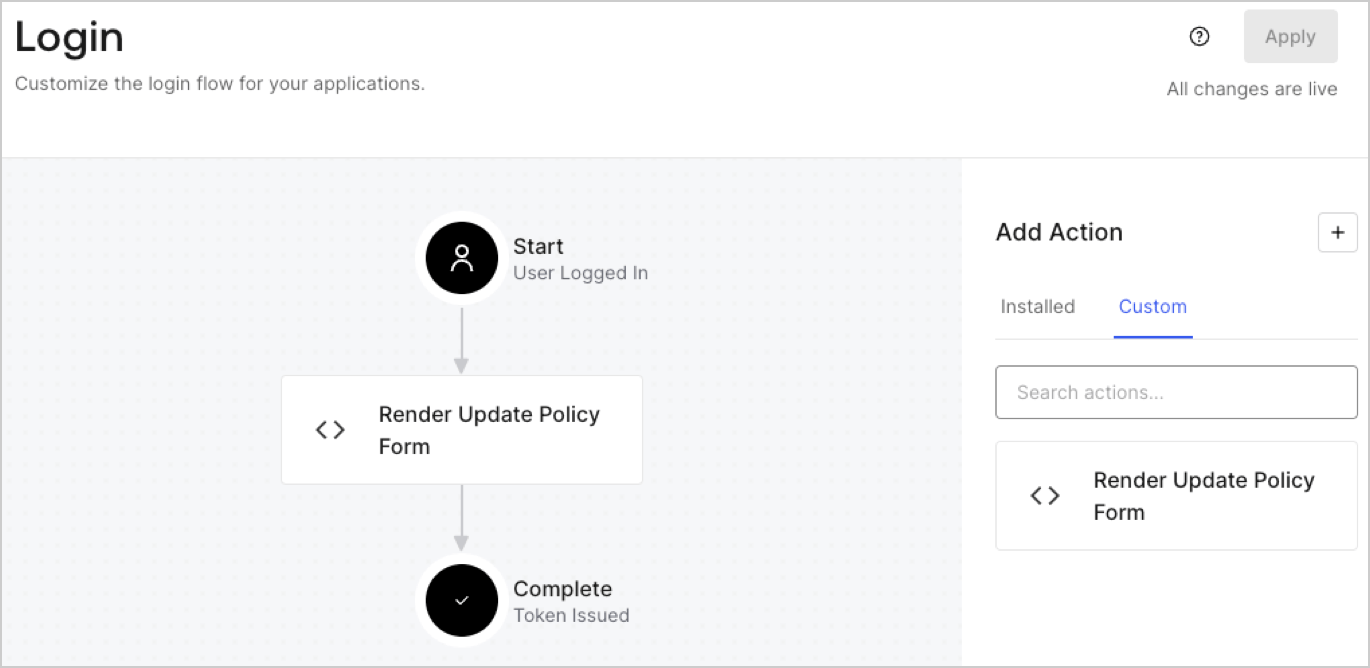
1. Navigate to **Auth0 Dashboard > Actions > Flows > Login.**
2. Select the **+** icon and Select **Build from scratch**:

   * **Name**: Enter `Render Update Policy Form`.
   * **Trigger**: Select `Login / Post Login`.
   * **Runtime**: Select the recommended version.
3. Select **Create**.

To configure the post-login Action:

1. Delete the existing code from the Code editor.
2. Paste the form render code into the Code editor.
3. Edit the code to define the conditional logic that will render the form.

   ```javascript lines theme={null}
   /**
   * @param {Event} event - Details about the user and the context in which they are logging in.
   * @param {PostLoginAPI} api - Interface whose methods can be used to change the behavior of the login.
   */
   exports.onExecutePostLogin = async (event, api) => {
     const FORM_ID = 'REPLACE_WITH_YOUR_FORM_ID';

     if (event.user.app_metadata.privacy_policies !== true) {
       api.prompt.render(FORM_ID);
     }
   }

   exports.onContinuePostLogin = async (event, api) => { }
   ```

   <Callout icon="file-lines" color="#0EA5E9" iconType="regular">
     The example code above will render the form when a user is missing the app metadata `privacy_policies` property.
   </Callout>
4. Select **Deploy.**
5. Drag and Drop the **Render Update Policy Form** Action to the **Login** flow.
   <Frame>
     <img src="https://mintcdn.com/docs-dev-feat-anonymous-sessions/-PAdwXHCoNAvQcVm/docs/images/cdy7uua7fh8z/5TOwDgevZsBqd7yZynUYWU/41ca909dc3007aed4f40ff794a05efa5/postlogin.png?fit=max&auto=format&n=-PAdwXHCoNAvQcVm&q=85&s=bbf9474f698e1a4b27dc0d8baf386c84" alt="Dashboard > Forms > Use Case > Render update policy form login action" data-og-width="1370" width="1370" data-og-height="668" height="668" data-path="docs/images/cdy7uua7fh8z/5TOwDgevZsBqd7yZynUYWU/41ca909dc3007aed4f40ff794a05efa5/postlogin.png" data-optimize="true" data-opv="3" srcset="https://mintcdn.com/docs-dev-feat-anonymous-sessions/-PAdwXHCoNAvQcVm/docs/images/cdy7uua7fh8z/5TOwDgevZsBqd7yZynUYWU/41ca909dc3007aed4f40ff794a05efa5/postlogin.png?w=280&fit=max&auto=format&n=-PAdwXHCoNAvQcVm&q=85&s=d9a26112806ab17884444127f0b253ef 280w, https://mintcdn.com/docs-dev-feat-anonymous-sessions/-PAdwXHCoNAvQcVm/docs/images/cdy7uua7fh8z/5TOwDgevZsBqd7yZynUYWU/41ca909dc3007aed4f40ff794a05efa5/postlogin.png?w=560&fit=max&auto=format&n=-PAdwXHCoNAvQcVm&q=85&s=992f9fbaa94853446f54902bcd31086a 560w, https://mintcdn.com/docs-dev-feat-anonymous-sessions/-PAdwXHCoNAvQcVm/docs/images/cdy7uua7fh8z/5TOwDgevZsBqd7yZynUYWU/41ca909dc3007aed4f40ff794a05efa5/postlogin.png?w=840&fit=max&auto=format&n=-PAdwXHCoNAvQcVm&q=85&s=d92512cef7e9748cb4457c95b7fbb535 840w, https://mintcdn.com/docs-dev-feat-anonymous-sessions/-PAdwXHCoNAvQcVm/docs/images/cdy7uua7fh8z/5TOwDgevZsBqd7yZynUYWU/41ca909dc3007aed4f40ff794a05efa5/postlogin.png?w=1100&fit=max&auto=format&n=-PAdwXHCoNAvQcVm&q=85&s=e9e670ee877ca8c5ff12938669224c9f 1100w, https://mintcdn.com/docs-dev-feat-anonymous-sessions/-PAdwXHCoNAvQcVm/docs/images/cdy7uua7fh8z/5TOwDgevZsBqd7yZynUYWU/41ca909dc3007aed4f40ff794a05efa5/postlogin.png?w=1650&fit=max&auto=format&n=-PAdwXHCoNAvQcVm&q=85&s=3b1fd06d8f16cc322b99faf0e2291631 1650w, https://mintcdn.com/docs-dev-feat-anonymous-sessions/-PAdwXHCoNAvQcVm/docs/images/cdy7uua7fh8z/5TOwDgevZsBqd7yZynUYWU/41ca909dc3007aed4f40ff794a05efa5/postlogin.png?w=2500&fit=max&auto=format&n=-PAdwXHCoNAvQcVm&q=85&s=f0547644d80802cc63d67267c7ad715d 2500w" />
   </Frame>
6. Select **Apply.**

### Test implementation

Test the implementation by following these steps:

1. Log in with an existing user whose app`_metadata` attribute `privacy_policies` does not have a value.
2. The post-login Action in the Login flow will render the form and prompt for acceptance.
3. Select **Auth0 Dashboard > User Management > Users,** locate the user and verify that the `app_metadata` attribute `privacy_policies` contains a `true` value and a timestamp.
